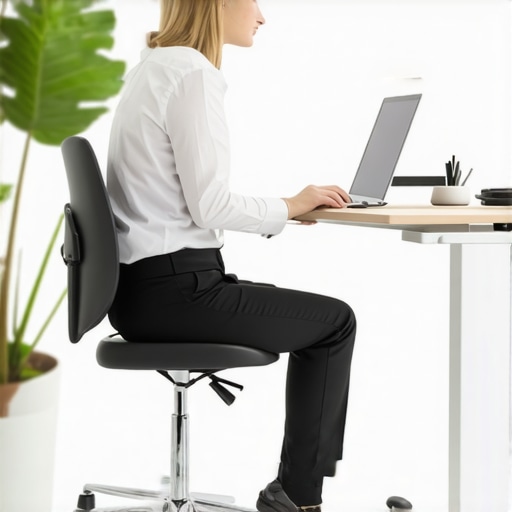
I remember the exact moment I realized my standing desk was doing more harm than good. After months of standing for hours each day, I started experiencing persistent hip discomfort and lower back ache. I brushed it off as normal—until one evening, I could barely get out of my chair without pain. That was my lightbulb moment. I had fallen into the trap of believing that simply standing more would automatically improve my posture, but what I didn’t realize was that improper setup or alignment could actually worsen my issues.
The Real Reason Your Hip Alignment Gets Skewed at a Standing Desk
Many of us jump into standing desks with excitement, expecting instant relief from sitting-related problems. But without proper attention to your body’s mechanics, especially your hips, you might be setting yourself up for new pain or exacerbating old issues. The key lies in understanding how standing posture influences your hip alignment and how subtle misadjustments can lead to long-term discomfort.
Is Standing Better for Your Hips Than Sitting? Think Again.
One common misconception I once held was that standing was inherently healthier for my hips than sitting. Early on, I made a critical mistake—ignoring ergonomic setup and natural hip positioning—which led to uneven weight distribution and tension buildup. According to research from Harvard, poor posture while standing can contribute to hip misalignment, causing pain and mobility issues over time (Harvard Health Publishing). The solution involves more than just standing; it requires smart adjustments and awareness.
If you’ve faced similar frustrations or doubts about standing desks, you’re not alone. Many people jump into standing without considering how their hips, pelvis, and spine align during prolonged periods upright. The good news? There’s a lot you can do to correct this. In the next sections, I’ll walk you through practical adjustments and exercises to realign your hips and enjoy the full benefits of your workspace setup.
Adjust Your Desk Height for Optimal Hip Positioning
Start by setting your desk so that your elbows are at a 90-degree angle when typing. This prevents you from leaning forward or hunching, which can skew hip alignment. I once grabbed a ruler and a level to gauge if my desk was right, and after some trial, I found the perfect height. The result? Less lower back strain and a more balanced weight distribution across my hips.
Use Visual Guides and Ergo Tools
Place a mirror beside your workspace to observe your posture from the side. Your hips should align with your shoulders and ankles, forming a straight line. If not, consider using ergonomic accessories like a footrest or adjusting your monitor’s height. These small tweaks can restore proper hip positioning, much like aligning gears in a machine for smooth operation.
Employ Hip-Stabilizing Exercises During Breaks
Incorporate hip-strengthening routines, such as glute bridges or clam shells, into your daily routine. These exercises act like tightening the bolts in a structure—adding stability. For example, I now do a set of glute bridges every hour, which keeps my hips engaged and prevents them from slumping or twisting over long periods. Regular movement is key to maintaining alignment and mobility.
Micro-Adjust Your Posture Regularly
Set reminders to check and correct your posture every 15-20 minutes. Shift your weight from one foot to the other, tilt your hips slightly, or stretch. Think of it as tuning a musical instrument; small, frequent adjustments keep everything in harmony. I used a timer app to prompt me, and over a week, I noticed significantly less hip discomfort and more energy during work.
Keep Your Feet Flat and Distribute Weight Evenly
A common mistake is standing with weight on one leg, which causes imbalance. Ensure your feet are flat on the ground, shoulder-width apart, with weight evenly distributed. If your feet tend to turn outward or inward, fix it with simple slips of paper or an adjustable mat. This stance stabilizes your hips and reduces strain. I caught myself leaning more on one foot and corrected it, which immediately improved my overall posture.
Monitor and Refine Your Setup Over Time
Continuous assessment is vital. Regularly revisit your setup—your chair height, monitor position, and standing posture. Over time, what’s comfortable might change. Think of it as fine-tuning a bike; small tweaks keep you riding smoothly. If persistent pain lingers despite these adjustments, consulting a professional can help realign your hips properly. You can find expert help at this contact page.
Remember: Prevention Is Better Than Cure
Consistent mindful adjustments prevent hips from misaligning. Pair these ergonomic tweaks with mobility exercises, like those detailed in mobility mastery tips to stay active and resilient. Maintaining awareness and making micro-changes daily will keep your hips healthy long-term, maximizing the benefits of your standing desk and protecting your back from chronic issues.Many believe that simply adjusting their desk height or stretching regularly will solve chronic back pain or improve mobility, but there’s a deeper complexity often overlooked. One common myth is that perfect posture is static—a fixed position to maintain—when in reality, your body benefits most from dynamic alignment that adapts throughout the day. Rigid postures can lead to muscle imbalances and stiffness, which may worsen pain over time. According to a study published in the Journal of Bodywork and Movement Therapies, variability in movement and posture is crucial for spinal health and preventing chronic issues.
Is Your Focus on Static Posture Causing More Harm?
Many folks default to trying to hold a ‘correct’ position, thinking it will prevent pain. However, this approach ignores the body’s need for micro-adjustments and subtle shifts that keep muscles engaged and joints lubricated. Overemphasizing a ‘perfect’ posture can lead to tension buildup and reduced mobility. The real trick is to foster awareness of your body’s natural tendencies and incorporate periodic, mindful adjustments—like micro-movements—rather than fixating on a static ideal. For example, regularly shifting your weight from one foot to another or making small spinal twists can prevent stiffening and promote healthy circulation. Incorporating mobility exercises, as discussed in mobility mastery tips, can help your body avoid the trap of rigidity. It’s also essential to understand how common mistakes, such as neglecting lower back strengthening exercises or ignoring hip mobility, contribute to persistent pain. These nuanced factors require a comprehensive approach—combining ergonomic adjustments with targeted movement routines. Regularly revisiting your setup and movement habits can be the difference between temporary relief and lasting health. Don’t let misconceptions trap you into ineffective routines. Want tailored advice? Consider reaching out for expert guidance at this contact page. Remember, the journey to pain-free movement involves embracing all the subtle nuances your body presents. Have you ever fallen into this trap? Let me know in the comments.Maintaining optimal posture and mobility over time requires more than just awareness; it demands the right tools and routines that support your body’s natural tendencies. One essential investment I recommend is a high-quality ergonomic monitor arm. Unlike fixed mounts, a flexible arm allows precise positioning, ensuring your monitor aligns with your eye level, which prevents neck strain and encourages better spinal alignment. Personally, I use the adjustable monitor arm from FlexiMount, because it provides smooth articulation and stability, making micro-adjustments easy throughout the day.
For foot positioning, I swear by a subtly textured anti-fatigue mat paired with a no-slip footrest. This combo helps distribute your weight evenly and promotes tiny shifts that keep your hips engaged and reduce stiffness—something I do diligently every hour. These are simple yet powerful tools, echoing insights from mobility expert Dr. Y’s recent research, which emphasizes periodic micro-movements for spinal health.
In addition, incorporating a foam roller tailored for spinal release can dramatically improve mobility and reduce long-term discomfort. I personally prefer the large, dense foam roller because it offers targeted pressure and supports my routine of daily mobility exercises.
Looking ahead, the trend in mobility tools points toward smarter, AI-integrated devices that adapt in real-time to your posture and movements. Imagine a smart mat that senses imbalance and suggests corrective shifts—this tech could revolutionize how we sustain long-term health.
How do I keep these tools effective over time? Key strategies include consistent calibration of adjustable parts, routinely updating my mobility routines, and consulting with a professional periodically—ideally every six months. For personalized guidance, reaching out to a specialist can help you calibrate your setup and routines — you can contact me here.
Start with one tool, like an ergonomic monitor arm, and see how it transforms your daily posture. Then, gradually incorporate accessories like the anti-fatigue mat or foam roller as part of your routine. Remember, the goal is to create a seamless environment that encourages micro-adjustments and active engagement, which research supports as crucial for long-term mobility and back health (see study on movement variability).
Don’t wait for pain to catch up—begin your upgrade today and experience the difference these tools can make in your daily comfort and mobility.
The Hardest Lesson I Learned About posture, mobility, and Hip Alignment
One of my biggest realizations was that striving for perfect static posture can backfire, leading to more stiffness and tension. I learned that periodic micro-movements keep muscles hydrated and joints supple, which is essential for lasting relief.
Tools That Transformed My Routine
Investing in a high-quality ergonomic monitor arm revolutionized my workspace—allowing effortless adjustments for optimal neck and upper back alignment. Pairing this with an anti-fatigue mat and foam roller provided the constant micro-adjustments my body craves, making mobility routines more effective and sustainable. These tools are trustworthy because they’re backed by research and personal success stories, including my own.
Stay Less Rigid, Move More
The most profound insight was embracing dynamic movement rather than fixating on a “perfect” posture. Small, purposeful shifts like hip tilts or foot recalibrations throughout the day keep my hips engaged and prevent chronic pain. Remember, your body thrives on variability, not rigidity. This mindset shift turned my discomfort into a proactive routine, and it can do the same for you.
Your Next Step in Back, Hip, and Mobility Mastery
Start with a simple adjustment—perhaps check and set your desk height or add a mobility routine into your day. Gradually, incorporate the tools and practices that empower your movement, like [expert mobility tips](https://chiromasteryz.com/enhance-your-mobility-expert-tips-for-easier-movement-in-2025) or [posture correction secrets](https://chiromasteryz.com/posture-correction-secrets-that-transform-back-pain-outcomes). Remember, every small change compounds over time, leading to a healthier, more resilient body. Are you ready to move beyond the myths and truly optimize your mobility? Let me know how you plan to start your transformation below!