There was a morning not long ago when I woke up feeling as if I’d been hit by a truck—neck stiff, tingling down my arm, and a stubborn pain between my shoulder blades. I had been ignoring my workspace setup for months, thinking it was just bad posture or maybe that I’d need another massage. But that day, I realized something was seriously off—my body was giving me a clear warning. It was then I had a lightbulb moment about the role of monitor height in neurovascular health.
Why My Desk Setup Became My Worst Enemy
For years, I sat hunched over my laptop, screens at eye level or lower, my neck craned forward. I’d always thought that as long as I wasn’t looking down, I was good. But I overlooked the subtle cues: nagging discomfort, numbness, and occasional numb paralyzing pain that seemed to creep up from nowhere. Turns out, the position of my monitor was inadvertently putting pressure on my cervical nerves, especially around the C7-T1 level. This is a common hotspot for nerve impingement, yet many overlook how ergonomic mistakes in desk setup can cause such issues.
Adjusting my monitor to the correct height changed everything. Suddenly, my neck felt less strained, and those tingling sensations faded. It was an eye-opening experience because I had always assumed that my pain was due to more complicated spinal issues or profound injuries. But often, simple changes—like the monitor height hack I adopted—can make a world of difference.
Is Your Workspace Setting Sabotaging Your Health?
I used to believe that pain was inevitable with a desk job, that perhaps I just needed to live with it. But early on, I made a mistake I see many others make: neglecting basic ergonomics. It’s tempting to ignore such details when you’re busy, but the long-term consequences can be serious. Whether you’re experiencing discomfort now or want to prevent future nerve issues, aligning your workspace correctly is crucial.
If you’re tired of recurring neck pain, numb limbs, or headaches, you might want to check if your monitor height is contributing. Sometimes, a quick adjustment—like raising your screen to eye level—can prevent nerve pressure and reduce the risk of more serious conditions. And trust me, this isn’t just about comfort; it’s about safeguarding your nervous system’s health. Studies show that proper ergonomic alignment reduces strain and dysfunctions linked to nerve impingement (read more here).
This simple hack was a game-changer for me, and I believe it can help many of you too. So, ready to take a closer look at your setup? Let’s dive into how you can practically implement this crucial adjustment, alongside other tips to bolster your mobility and prevent nerve pressure issues.
Set Your Screen Correctly and Feel the Difference
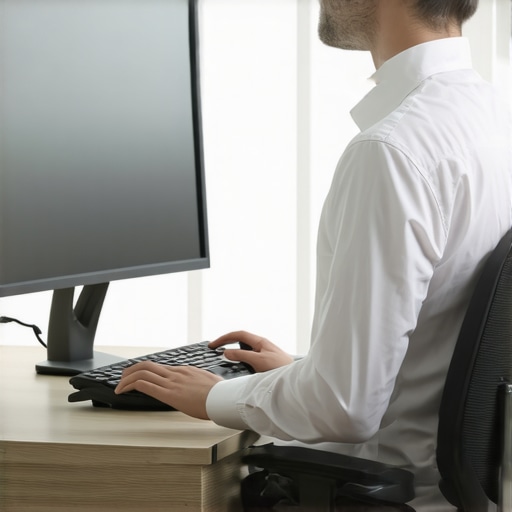
Imagine your monitor as the steering wheel of your ergonomic setup. Just like steering a car requires the wheel to be at the right height to control smoothly, your screen should be positioned to keep your neck and nerves relaxed. When I first adjusted my monitor from below eye level to directly at eye level, it was chaotic — I jiggled the height, leaned in, leaned back, and even resorted to stacked books. After some trial and error, I found the sweet spot—about a hand’s width above my seated eye level. The result? Immediate relief from tingling and neck strain. To do this, measure your seated eye height, then raise or lower the monitor so the top is just below or level with your eyes. Use sturdy stacks, adjustable stands, or monitor risers. It’s a tangible change that can clear nerve pressure, reducing the risk of impingement (see more about spinal adjustments).
Align Your Keyboard and Mouse to Avoid Overreach
Think of your arms as the windshields of your ergonomic car. If they’re stretched too far forward or to the side, tension builds and nerves get pinched. Position your keyboard directly in front, at a height where your elbows are at a roughly 90-degree angle. I struggled with my keyboard sliding forward, causing me to crane my neck and hunch my shoulders. I fixed it by placing my keyboard on a low riser or adjustable tray so my forearms are parallel to the ground. Use a separate mouse close to the keyboard to prevent reaching across. This simple local adjustment keeps your shoulders and neck in a neutral, relaxed position — every millimeter counts in preventing nerve strain (see related mobility tips).
Maintain Proper Posture During All Movements
Your body’s kinetic chain is like a well-oiled machine. Think of a chain where every link supports the next — if one link is out of alignment, tension propagates, causing discomfort and nerve impingement. When adjusting your monitor, set your chair height so your hips are slightly above your knees, and sit back fully in your chair. Keep your feet flat on the floor. During breaks or stretching, pay attention not to hunch or crane your neck. Repeated misalignments can contribute to chronic nerve pressure, especially around the cervical and thoracic areas. A quick check: in a seated position, imagine a straight line running from your ear through your shoulder to your wrist. If it deviates, readjust. These positional tweaks can dramatically reduce nerve pressure, curbing debilitating tingling sensations (more on spinal routines).
Incorporate Movement to Keep the Nerves Happy
Sitting still like a statue can cause nerves to get compressed just like a traffic jam in rush hour. I found that taking short, frequent breaks to stand, stretch, and walk increased circulation and relieved pinched nerves. For example, every 30 minutes, stand up, reach overhead, and gently tilt your head side to side. These micro-movements encourage fluid flow around your cervical nerves, reducing pressure and stiffness. Think of your nerves as cables that need to be flexed regularly; neglecting them leads to kinks and blockages. Incorporate mobility exercises or gentle neck rolls into your routine, especially if you work long hours. Simple gestures, like shoulder rolls or chin tucks, can keep your cervical nerves from bottlenecking and prevent numbness or tingling (see mobility exercises here).
Steady Progress for Lasting Impact
When I first started adjusting my monitor, I anticipated a quick fix. Instead, it was a gradual process—fine-tuning, testing, and feeling how each change influenced my symptoms. Keep a checklist—height, distance, posture—and reassess weekly. Fair warning: sometimes a small tweak may initially feel awkward or unbalanced, but persistence pays off. Remember, like a skilled chiropractor adjusting a spine, small, deliberate movements create profound, long-term health benefits, especially for your nerves. Consistency in maintaining these setups will drastically decrease nerve impingement risks and keep your daily functions pain-free (learn more about mobility mastery).Many believe that simply correcting posture or performing occasional adjustments will resolve chronic back pain, but this oversimplification often leads to missed nuances that could make or break your recovery. In my experience, one common myth is that all back pain stems from muscular imbalance, ignoring the intricate role of nerve and joint interactions. For example, focusing solely on stretching tight muscles can sometimes exacerbate symptoms if joint misalignments or nerve impingements are overlooked. Advanced practitioners recognize that the nervous system’s feedback loops profoundly influence muscular responses, which means that addressing only superficial symptoms without considering underlying joint restrictions can be counterproductive.
A vital mistake is assuming that correct posture is static; in reality, posture is dynamic and varies with movement and context. Rigidly fixating on perfect alignment can lead to compensatory patterns elsewhere. The key is to cultivate adaptable mobility and awareness, rather than rigid positioning. Moreover, many overlook the importance of subtle joint mobilizations and nerve glides that can unlock chronic restrictions, especially in the thoracic and cervical regions. Incorporating targeted techniques, such as gentle spinal adjustments or nerve mobility exercises, can drastically improve outcomes (see expert mobility tips here).
Are There Risks in Overemphasizing Correct Posture at the Expense of Movement Freedom?
Indeed, obsessing over maintaining perfect posture can harden the nervous system’s adaptability, leading to stiffness and restricted movement. This trap is often called out by specialists who emphasize functional mobility over static alignment. A rigid approach might create a false sense of security but ignore the body’s need for fluid movement patterns that distribute load and tension effectively. Researchers have found that promoting movement variability helps maintain joint health and reduces nerve entrapment risks (study on movement variability).
Understanding these nuances underscores the importance of a balanced approach—one that combines ergonomic adjustments with dynamic mobility exercises. Implementing daily gentle joint mobilizations and nerve glides can prevent the subtle traps that lead to chronic pain, helping you stay adaptable and resilient. Remember, it’s not just about fixing what’s broken but fostering a body capable of healthy, pain-free movement through informed, nuanced strategies.
Have you ever fallen into this trap? Let me know in the comments or reach out through our contact page to discuss customized solutions for your back health.
Invest in Precision Tools for Lasting Results
To truly maintain optimal posture and mobility, using high-quality tools can be a game-changer. I personally rely on an adjustable monitor stand with a gas spring arm—this allows me to finely tune the screen height throughout the day, accommodating posture shifts and preventing nerve impingement. Unlike fixed risers, these stands prevent the monitor from slipping, maintaining consistent alignment and reducing strain (see mobility tips for 2025).
Additionally, investing in an ergonomic keyboard with tenting options ensures the wrists remain in a neutral position, lessening tension in the shoulder and neck areas. I prefer models with split keys, which facilitate a more natural hand position and prevent overreach—a common cause of nerve compression. The real magic lies in integrating these tools into your daily routine, making postural habits automatic instead of burdensome.
Use Smart Software to Monitor and Improve Posture
Technology can complement physical tools beautifully. I use posture reminder apps that gently alert me if I stay in the same position too long or slouch. One I recommend is Upright GO, which provides real-time feedback and logs your posture trends over weeks. This data helps identify patterns—maybe you lean forward during meetings or slouch after lunch—and adjust accordingly (see strategies for pain-free movement).
In future trends, I predict wearable tech with integrated sensors will become more sophisticated, providing biomechanical feedback and personalized corrections. So, investing now in these solutions prepares you for a seamless transition into smarter health maintenance.
How do I maintain my mobility and postural health over time?
The key with tools is consistency. Regularly calibrate your equipment—adjust your monitor height weekly, recalibrate your ergonomic setup, and stay vigilant with software alerts. Incorporate habits like static stretching and nerve glides into your daily routine—something like the mobility exercises I swear by—to keep tissues pliable and nerves happy. Remember, even the best tools only work if used diligently. As I continue refining my setup, I notice a significant reduction in nerve pressure symptoms, reinforcing that maintenance isn’t a one-time fix but an ongoing journey. Try employing an adjustable monitor arm today and see how subtle shifts in your workspace can yield long-term benefits for your spinal health.
Throughout this journey, I learned that tackling back pain isn’t about complex therapies but paying close attention to everyday details that influence our nervous system. One unexpected insight was discovering how a simple monitor height adjustment could relieve nerve pressure and dramatically improve my mobility. It’s a testament to how small, mindful shifts in our habitual environment can unlock significant health benefits, reminding us that sometimes, the answers are tucked into the tiniest details of our daily routines.
Lessons Hidden in My Ergonomic Awakening
- The power of observation over assumptions: I once believed my pain stemmed from deep spinal issues. The real breakthrough came when I started noticing the subtle cues my body was offering, like tingling and neck tension, which pointed directly to monitor placement.
- The value of experimentation and patience: Adjusting my monitor was not a one-time fix. It involved trial, error, and listening to how my body responded, reinforcing that ergonomic improvements often require ongoing fine-tuning.
- Ergonomics as a dynamic process: Static setups can cause static issues. Moving components to adapt to changing positions during the day helped me maintain nerve health and prevent chronic tension.
Tools That Changed My Approach
- Adjustable monitor arms: These allowed me to effortlessly reposition my screen, ensuring it was always at eye level, drastically reducing neck strain and nerve impingement.
- Ergonomic keyboards with tenting features: When paired with monitor adjustments, these tools supported a neutral arm and wrist position, avoiding overreach that causes shoulder and nerve stress.
- Posture reminder apps: Technology that gently nudges me back into proper alignment keeps awareness high and habits consistent, complementing physical adjustments beautifully.
Your Next Step: Embrace Precision and Movement
Remember, each small change can ripple into a healthier, pain-free future. Don’t hesitate to experiment with your workspace setup—adjust your monitor, incorporate mobility exercises, and stay attentive to your body’s signals. Your nerves will thank you for the effort, and your daily comfort level will thank you even more. What’s the first ergonomic tweak you plan to try today to improve your back and nerve health? Share your thoughts below—I’d love to hear your journey toward better posture and mobility.